
Almost every week someone tells us the same thing: “We built a website months ago and it still doesn’t come up on Google.” The site looks fine. The business is real. The pages are there. And yet searching for the service turns up eleven competitors and no sign of them.
It is rarely one dramatic problem. It is usually one of six ordinary ones — and they need fixing in a particular order, because the later fixes do nothing while an earlier one is still broken.
First, find out whether Google has your site at all
Before changing anything, check what Google already knows. Type this into the search bar, using your own domain:
site:yourdomain.comWhat comes back tells you where you stand:
- No results at all — Google has not indexed a single page. This is a technical problem, not a content problem.
- A few pages, but not the important ones — those specific pages are blocked, too new, or considered not worth keeping.
- Everything is there — indexing is fine. Your problem is ranking, which is a different fight.
Then set up Google Search Console if you have not already. It is free, it takes about ten minutes, and it is the only place Google tells you directly why a page is not appearing. Everything below is much easier to diagnose with it than without it.
1. The page is blocked from being indexed
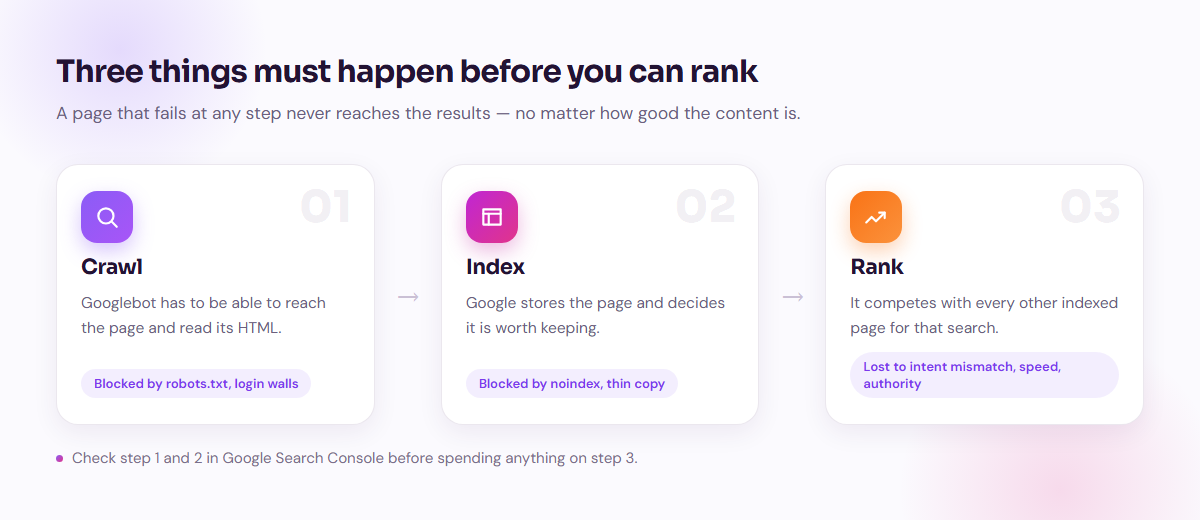
This is the most common cause of a brand-new site being completely invisible, and the most frustrating, because the site looks perfect to you.
The usual culprits:
- A leftover
noindextag. Developers add one so an unfinished site does not get indexed, then forget to remove it at launch. WordPress has a checkbox for this — Settings → Reading → “Discourage search engines from indexing this site.” It stays ticked more often than anyone would like. robots.txtblocking everything. A strayDisallow: /tells every crawler to stay out of the entire site.- Content that only exists after JavaScript runs. Google can render JavaScript, but it is slower and less reliable than reading HTML. If your page arrives empty and fills in afterwards, expect delays and gaps.
- No internal links and no sitemap. If nothing links to a page and it is not in your
sitemap.xml, Google may simply never find it.
In Search Console, open Pages under Indexing. It lists every page Google chose not to index and the reason for each one. Fix those reasons first. Nothing else you do matters until this is clean.
2. Google has your pages, but you are not on page one
If site: shows your pages but searching for your service does not, you are indexed and losing on merit. That usually comes down to search intent.
Someone searching “web design company Dhaka” wants to compare companies. Someone searching “how much does a website cost” wants a number. Those are different needs, and a single page cannot serve both well. Look at what currently ranks for the phrase you want — if the top ten are all comparison lists and your page is a sales pitch, you are answering a question nobody asked.
The fastest ranking wins usually come from pages that already sit on the second page. They are close. A better match to intent, a clearer title and some genuine depth often move them up without any new links.
3. You have no page targeting what people actually search
Many business sites have five pages: Home, About, Services, Portfolio, Contact. That is a brochure. It gives Google almost nothing to match against real searches.
People do not search for “Services.” They search for “ecommerce website development Bangladesh,” “WooCommerce speed problem,” “restaurant website with online order.” Each of those deserves its own page that answers that specific question properly.
A practical way to find these: open Search Console, go to Performance, and sort by impressions. Any query with lots of impressions and almost no clicks is a search where Google is already showing you and users are choosing someone else. Those are your best candidates for a dedicated page.
4. The site is too slow on a phone
Google indexes the mobile version of your site, and it measures real user experience through Core Web Vitals. The thresholds worth knowing:
- LCP under 2.5 seconds — how long the main content takes to appear.
- INP under 200 milliseconds — how quickly the page responds when someone taps.
- CLS under 0.1 — how much the layout jumps while loading.
Speed rarely wins a ranking on its own, but it loses one reliably, and it costs you conversions regardless of ranking. On most of the sites we are asked to look at, the same three things are responsible: uncompressed images, too many plugins, and cheap shared hosting. Fixing those three usually does more than any amount of tuning.
5. Nobody links to you
Links from other sites are still how Google judges whether anyone else takes you seriously. A new domain with no links is competing against sites that have been accumulating them for years.
You do not need hundreds. You need real ones — a local business directory, a supplier or partner site, a chamber of commerce listing, a genuine mention from a client. Ignore anyone selling you a thousand links for a fixed price. Those either do nothing or actively hurt you.
6. You are invisible for local searches
If customers find you by area — “web design near me,” “IT company in Uttara” — then your Google Business Profile matters more than your website. It is what feeds the map results that sit above the normal ones.
Claim it, fill in every field, choose the right categories, add real photos, and keep your name, address and phone number written exactly the same way everywhere online. Then ask satisfied customers for reviews. It is free, it is fast, and for a local service business it is often the single highest-return thing on this list.
What a realistic timeline looks like
Nobody can promise you page one by next week, and anyone who does is selling something. What we typically see:
- Days — indexing fixes. Once a block is removed and the page is submitted, it can appear quickly.
- Weeks — Business Profile visibility, and movement on pages already sitting on page two.
- Three to six months — meaningful traffic from new content in a competitive market.
SEO is slow because trust is slow. The upside is that it compounds: unlike ads, the traffic does not stop when you stop paying.
The order to fix things in
- Run
site:yourdomain.comand connect Search Console. - Clear every indexing block it reports.
- Submit a sitemap and make sure every important page is linked from somewhere.
- Claim and complete your Google Business Profile.
- Fix mobile speed — images, plugins, hosting.
- Rewrite your weakest pages to match what searchers actually want.
- Build one new page for each real question your customers ask.
- Earn a handful of honest links.
Work top to bottom. Each step is wasted effort until the ones above it are done.
Not sure which one is your problem?
Most sites we look at are stuck on step two or three, and the owner had assumed it was step eight. If you would like us to check yours, send us the address — we will tell you what is actually blocking it, whether or not you work with us afterwards.